lunes, 4 de septiembre de 2017

WINDOWS. PS. GPO. Force gpupdate synchronitation - replication

[ ] Check the last GPO synchronitation

Command: gpresult /scope computer /v | more

Run CMD as administrator.


[ ] To get info OU or Machine


[ ] Apply the synchronitation to one Computer

Command:Get-ADComputer -Filter * -SearchBase "CN=PCXXXX5,OU=Test,OU=Maquinas,OU=Casa,OU=dept,DC=dominio,DC=LOCAL" | Foreach-Object {Invoke-GPUpdate -Computer $_.name -Force -RandomDelayInMinutes 0}


[ ] Apply the synchronitation to all computer in one OU

Command:Get-ADComputer -Filter * -SearchBase "OU=Test,OU=Maquinas,OU=Casa,OU=dept,DC=dominio,DC=LOCAL" | Foreach-Object {Invoke-GPUpdate -Computer $_.name -Force -RandomDelayInMinutes 0}

When you apply the command "Invoke-GPUpdate" all computers can view this screen


You can check the synchronitation whith the firt step.

More info: http://gonsystem.blogspot.com.es/2017/06/windows-ad-replication.html

Check at Windows 2012 R2
by GoN | Published: September 4, 2017 | Last Updated: 

viernes, 1 de septiembre de 2017

WINDOWS. PS. Test-Connection a new ping

Other possibility to do a PING with Power Shell is the command "Test-Connection " / "Test-NetConnection"

[ ] Check with times.

Command: Test-Connection google.com,adidas.com,nike.com


[ ] Only Check without times.

Command: Test-Connection google.com,adidas.com,nike.com -Quiet 


[ ] Check differnts sources

Command: Test-Connection google.com,adidas.com,nike.com -source XXXdc01, XXXdc02


To check all path

Test-Connection XXXdc01 -source  XXXdc02
Test-Connection XXXdc02 -source  XXXdc01

[ ] With information path

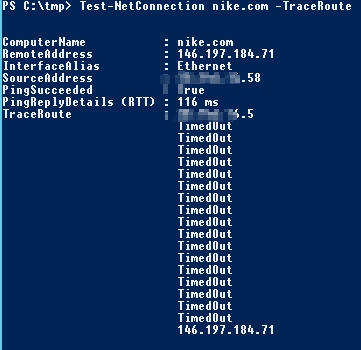
Command: Test-NetConnection nike.com -TraceRoute

1

My computer have one Proxy to go to internet it is the cause that I have a few IP at my TracerRouter.

[ ] Check computer port

Command: Enter-PSSession -ComputerName selected_host -Credential selected_User


[ ] More information

Command: Test-NetConnection XXXXXdc01


Command: Test-NetConnection google -port 443


Links: https://docs.microsoft.com/en-us/powershell/module/microsoft.powershell.management/test-connection?view=powershell-5.1


Check at Windows 2012 R2 & W10
by GoN | Published: September 1, 2017 | Last Updated: Dec 1, 2020

lunes, 31 de julio de 2017

WINDOWS. PS. Check OU computers

Subject: Check compurters OU to check there ara some host. Scheduler one daily task and inform us by email only if there are some host.

When you add new computer to AD by default is assigned to "Computers" OU, this script remember you to move at other OU.

[ ] Get-ADComputer


COMMAND: Get-ADComputer -Filter * -SearchBase "CN=COMPUTERS, DC=Mydomain, DC=local" | select-object -expand name


COMMAND: Get-ADComputer -properties * -Filter * -SearchBase "CN=COMPUTERS, 
DC=MyDomain, DC=local" | select name, DNSHOSTNAME,WHENCHANGED,WhenCreated | Format-Table


[ ] PS Script


#Creado 31/7/2017
#
#
Import-Module ActiveDirectory
#
#
#******************************************************************************************************* 
#[COMMON VARIABLES]

$emailbody = $nul
$emailbody = @()

$body= Get-ADComputer -properties * -Filter * -SearchBase "CN=COMPUTERS, DC=MyDomain, DC=local" | select name, DNSHOSTNAME,WHENCHANGED,WhenCreated | Format-Table | Out-String 

# [SEND EMAIL]


If (!$body) {


else 
{
$PSEmailServer = "11.116.116.2"
Send-MailMessage -From "OUComputers@micompany.es" -To "ServiceDesk@micompany.es; it@micompany.es" -Subject "PCs sin asignar en OU\COMPUTERS" -Body $body 
}

[ ] Schedule daily report


Check at Windows 2012 R2
by GoN | Published: July 31, 2017 | Last Updated: September 28, 2017